Monkey Wrench by EZDeals4U · Auto Shop Management · Windows 10 & 11

Your whole shop, tightened up.

Repair orders, warranties, inventory, payroll records, expenses and profit in one place, on the computer you already own.

Log a repair once and Monkey Wrench does the rest. It tracks the customer, deducts your parts, watches every warranty, tells you what to reorder before you run out, prints the invoice, and shows your real profit. Every expense, paycheck and receipt is kept the way IRS record-keeping guidance asks, so you're ready when your accountant calls. Works offline. One price. No monthly fees. Ever.

No subscription · No internet required · Your data stays on your computer · Records kept to IRS guidance
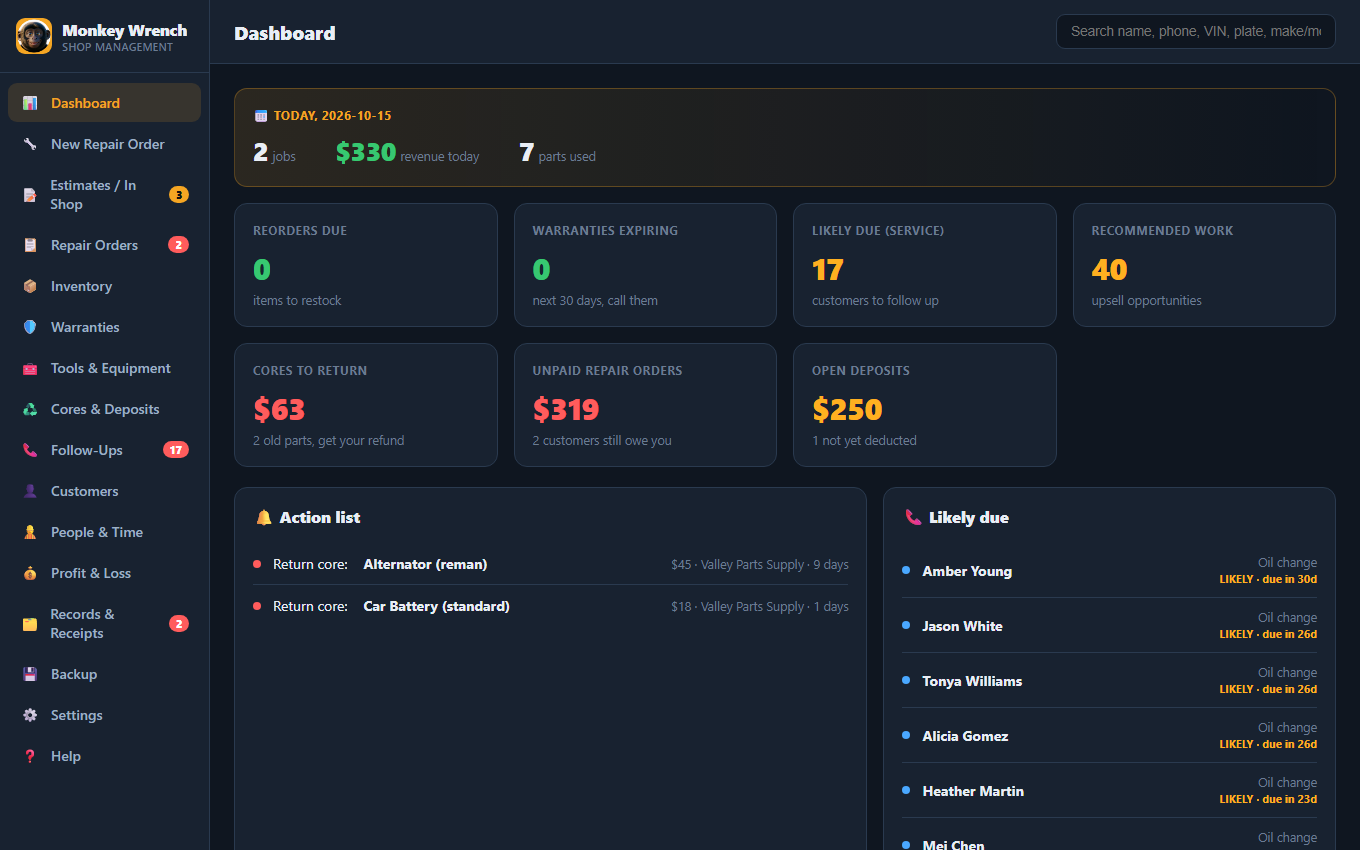
Monkey Wrench dashboard

Watch it work (2 minutes)

A bad day at the shop, then a real walk through Monkey Wrench: repair orders, inventory, warranties, invoices and profit.

Monkey Wrench video: stop monkeying around, $79 once, no monthly fees

The people and animals in the video are AI-generated actors. The app footage is a real screen capture.

Tired of renting your own shop software?

Every other shop tool charges you every single month, and quits the moment your internet hiccups. There's a better way.

😤 The big cloud tools

  • $79 to $427 every month, $2,000–5,000 a year, forever
  • Dies when your Wi-Fi drops. No internet, no shop
  • Your customer data lives on their servers
  • Their phone apps are limited, buggy companions (3.4★) that can't even run the shop
  • Stop paying = you lose access to everything

🔧 Monkey Wrench

  • $79 once. Yours forever. No monthly bill
  • Works offline. Wi-Fi down? You keep working
  • Your data stays on your computer
  • Runs the real work (invoices, inventory, profit) right on your desk
  • It's yours. It never expires and never locks you out

One repair order does everything

You already write up every job. Monkey Wrench turns that one entry into your whole back office, automatically.

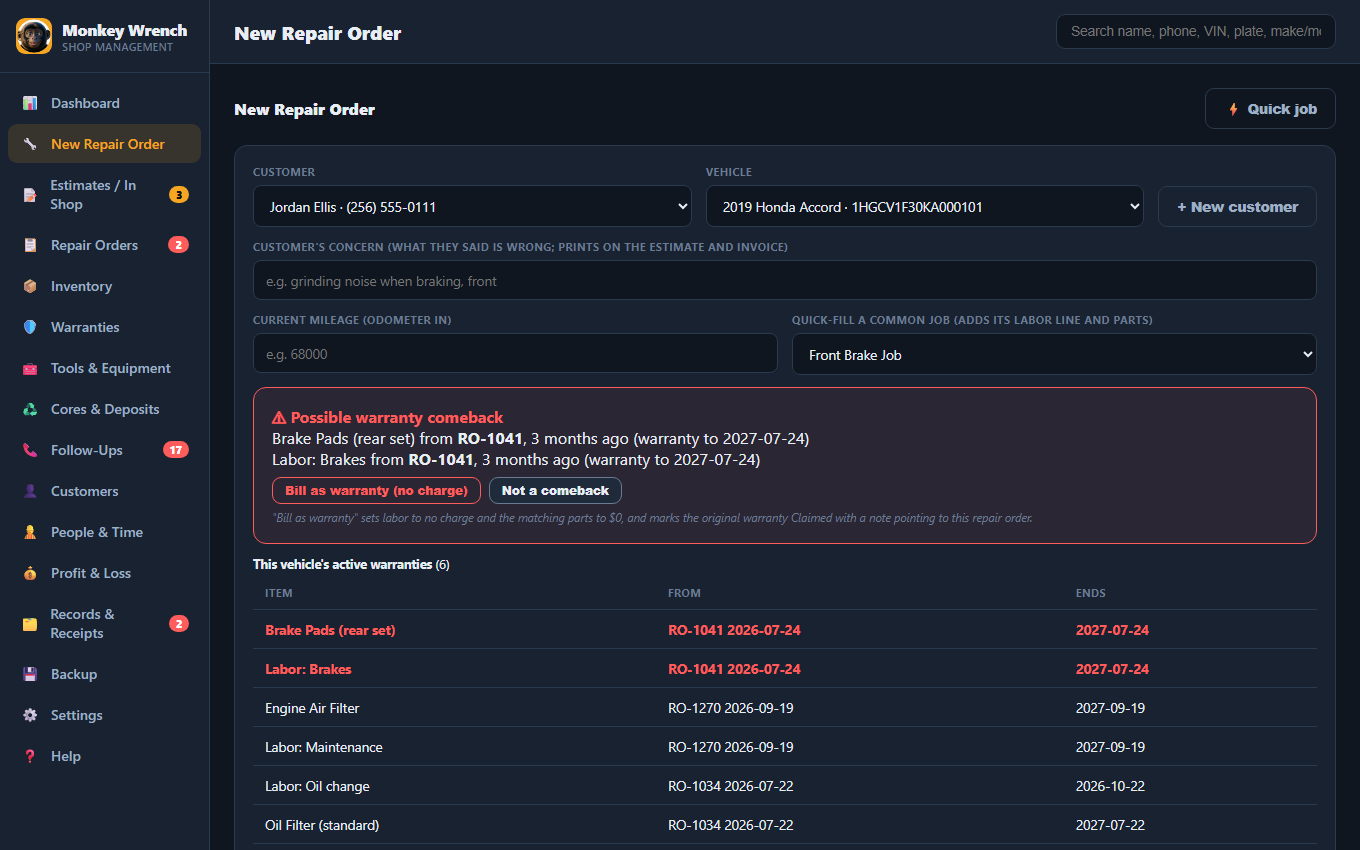
A new repair order in Monkey Wrench: customer, vehicle, concern, quick job and the warranty comeback warning
Never run out of a part

It predicts your reorders

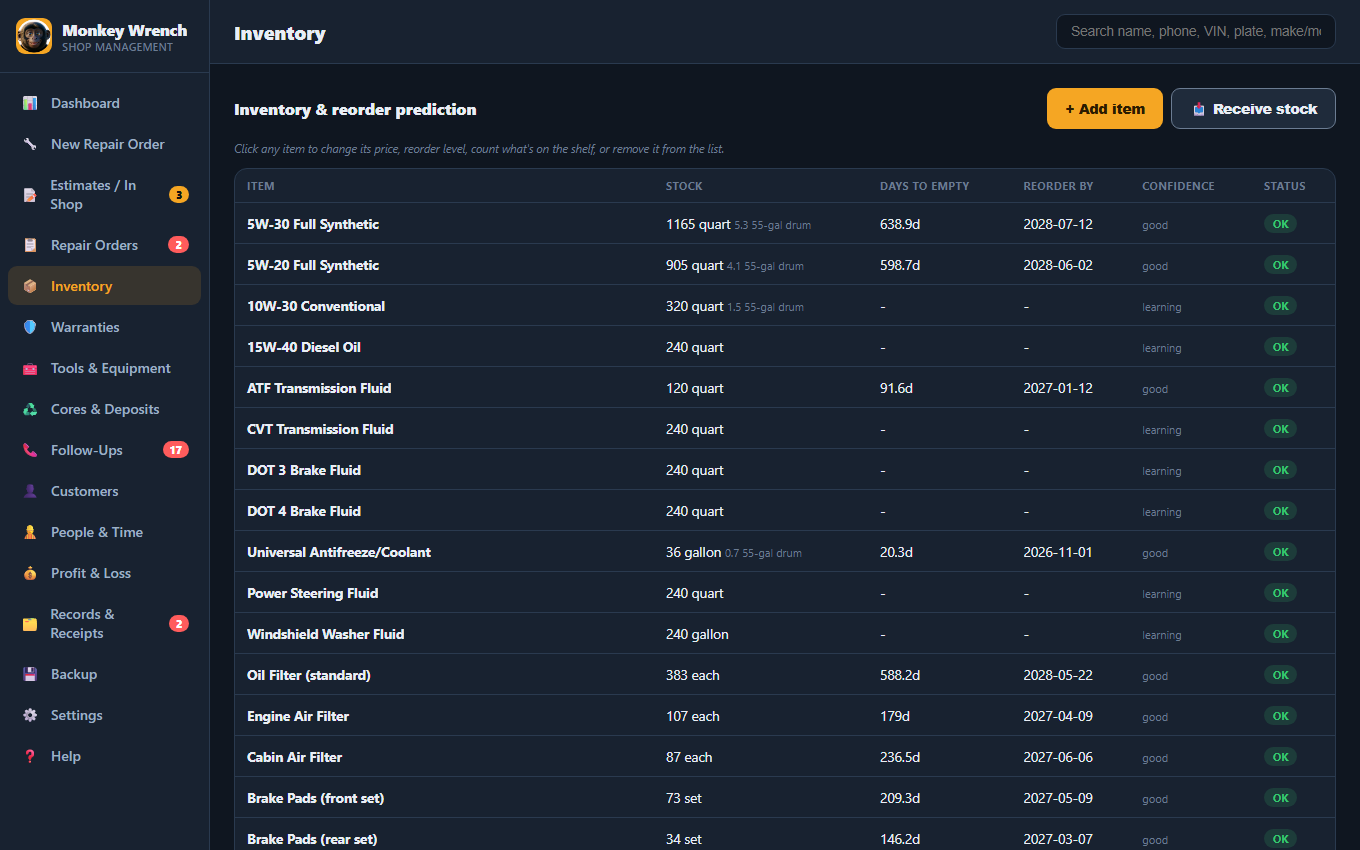
Every job automatically subtracts the parts you used. Monkey Wrench learns how fast you go through oil, filters, pads, and tells you what to reorder and when, before you're empty.

  • Buy in 55-gal drums, use by the quart, it converts automatically
  • A delivery comes in? "Receive stock" puts it straight on the shelf
Inventory and reorder prediction
Bring customers back

It never forgets a warranty or a follow-up

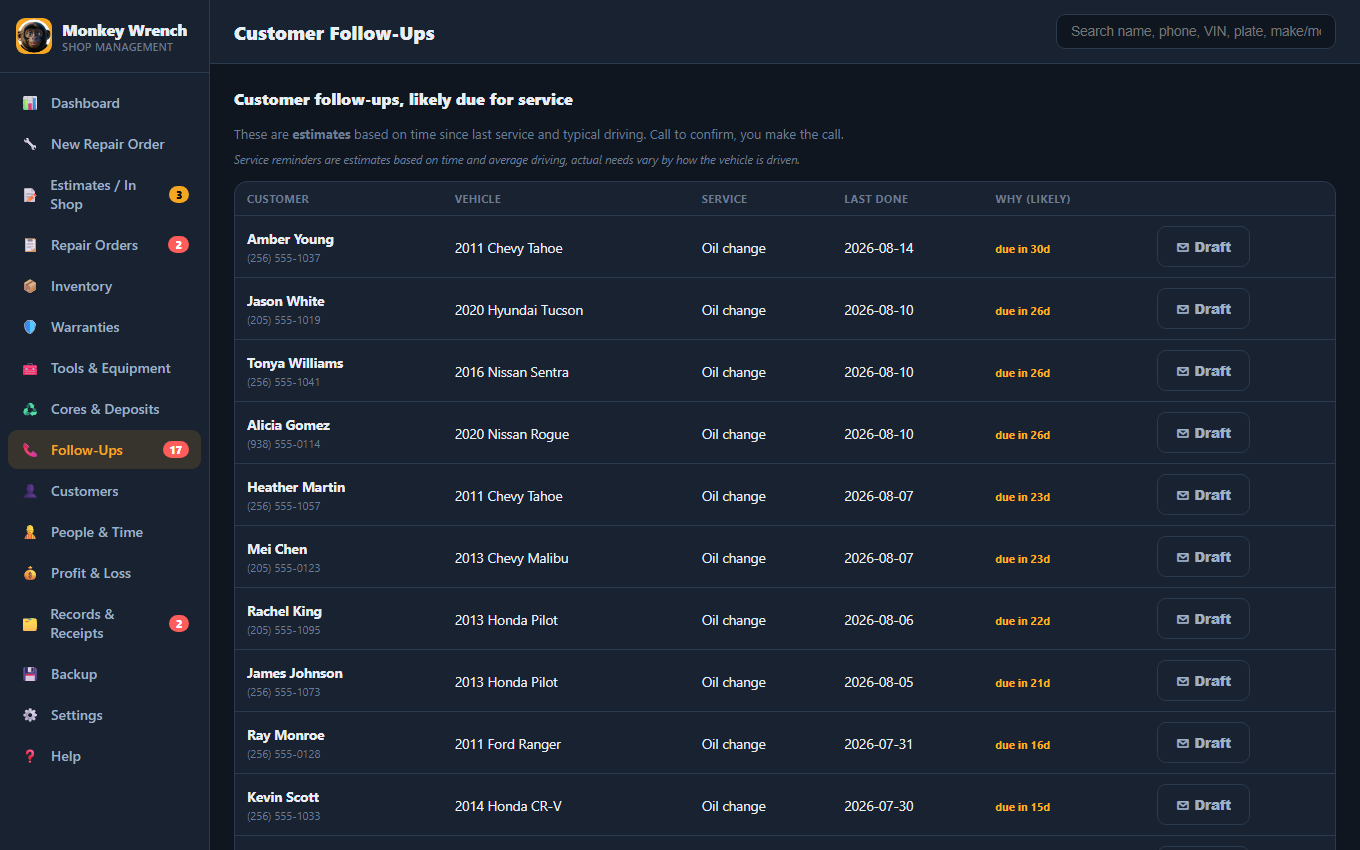
Monkey Wrench watches every part & labor warranty and reminds you to call the customer before it expires, a built-in reason for repeat business. It even flags the work a customer declined, so you can follow up next visit.

Warranty and service follow-ups
Know your real numbers

See your actual profit, not just sales

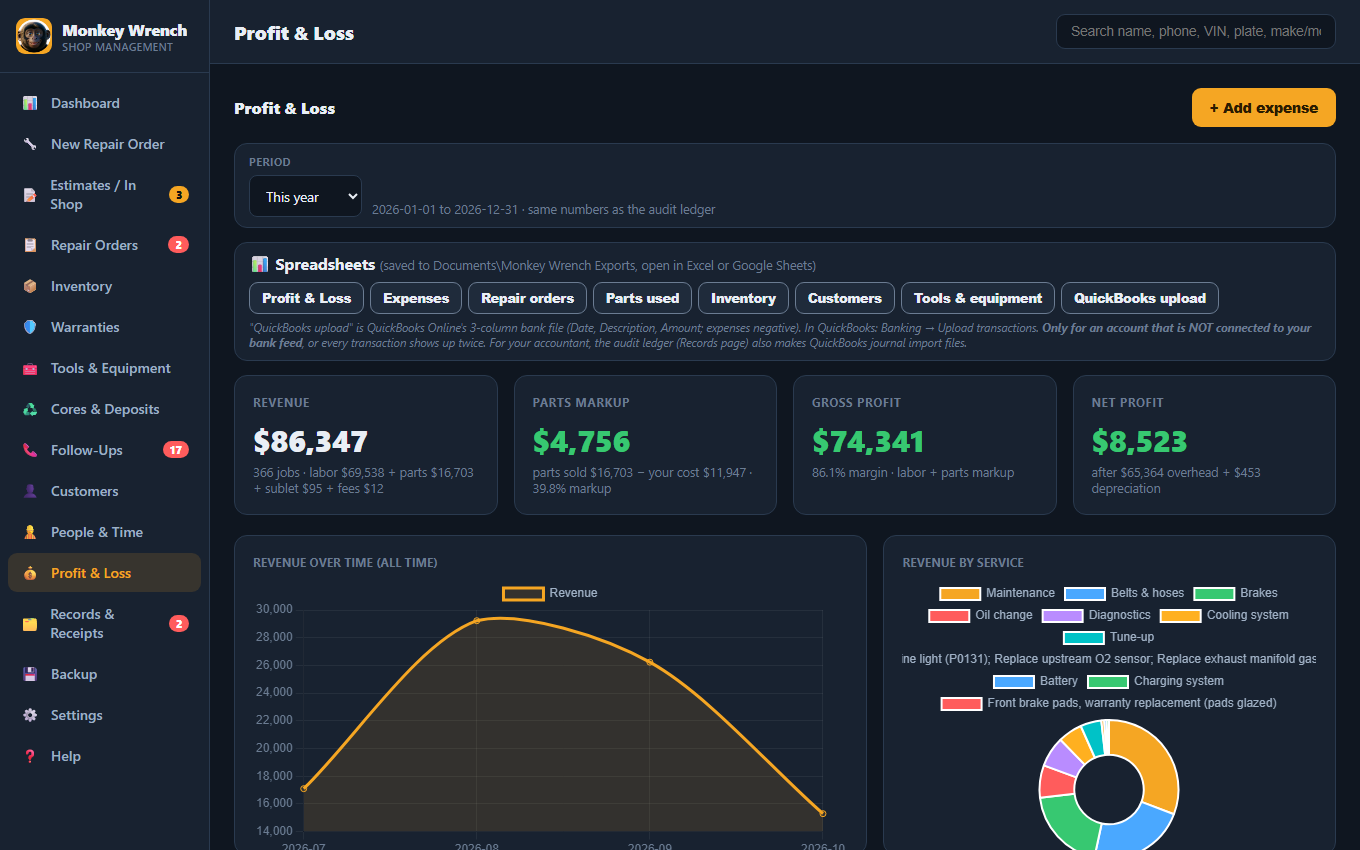
Revenue, parts cost, gross profit, and net after your overhead, with clear charts of how you're doing over time and which services make you the most money. Most owners have never seen this. Now it's one click.

Profit and Loss with charts
Look like the pro you are

An invoice with your logo on it

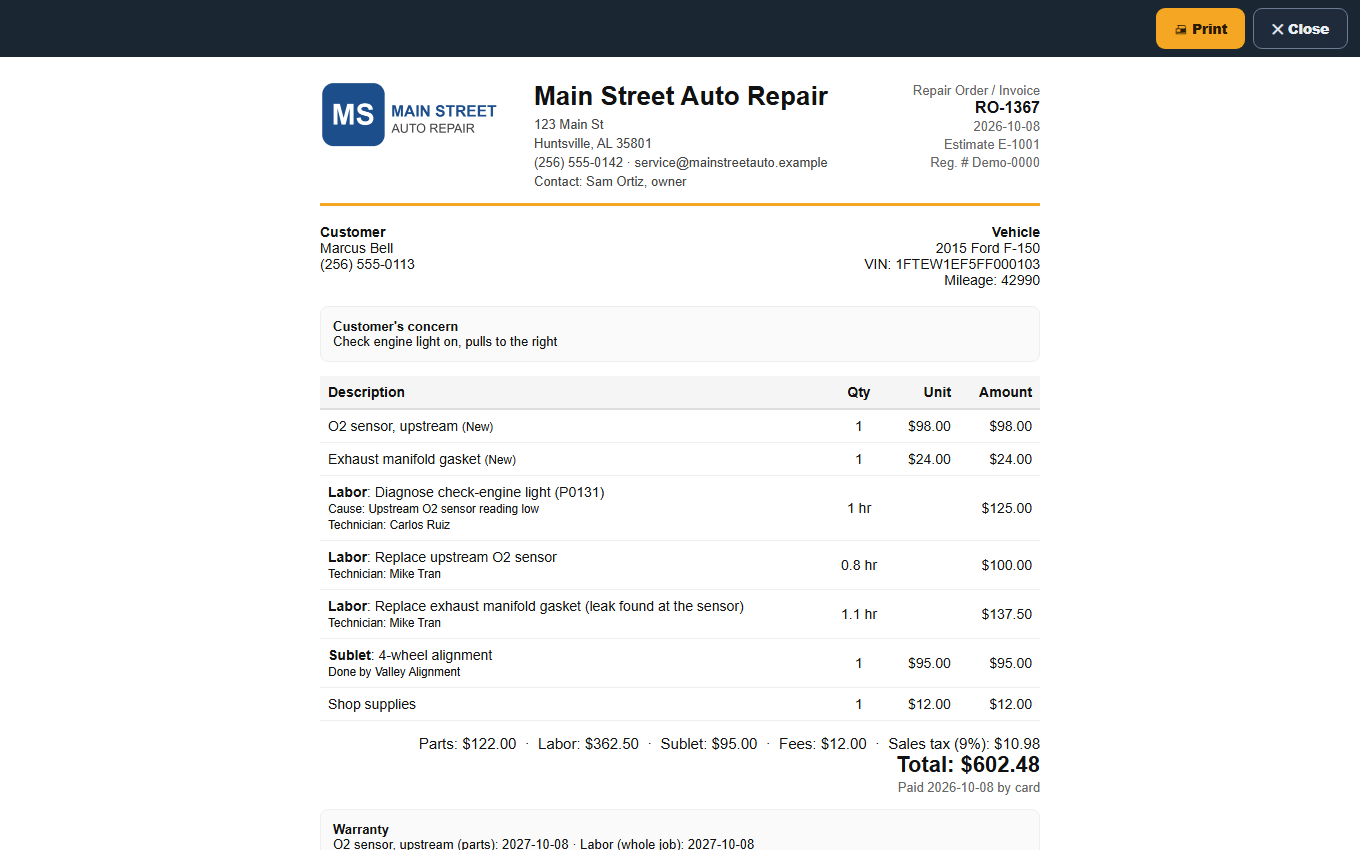
Your logo, address, phone, email and contact person at the top; your website and social links at the bottom. The customer sees their concern, the parts, labor, technician, sales tax, warranty dates and terms, the balance after any deposit, and a line to sign. Your cost never prints; you get a separate shop copy with your cost, markup and the parts store receipt.

  • Find any job by name, phone, VIN, plate, make and model ("Silverado"), the work done, or RO #
  • Parts priced from your cost plus your markup, automatically
Printed invoice with the shop's logo, address and links
No more "I never okayed that"

Get the customer's OK before you start

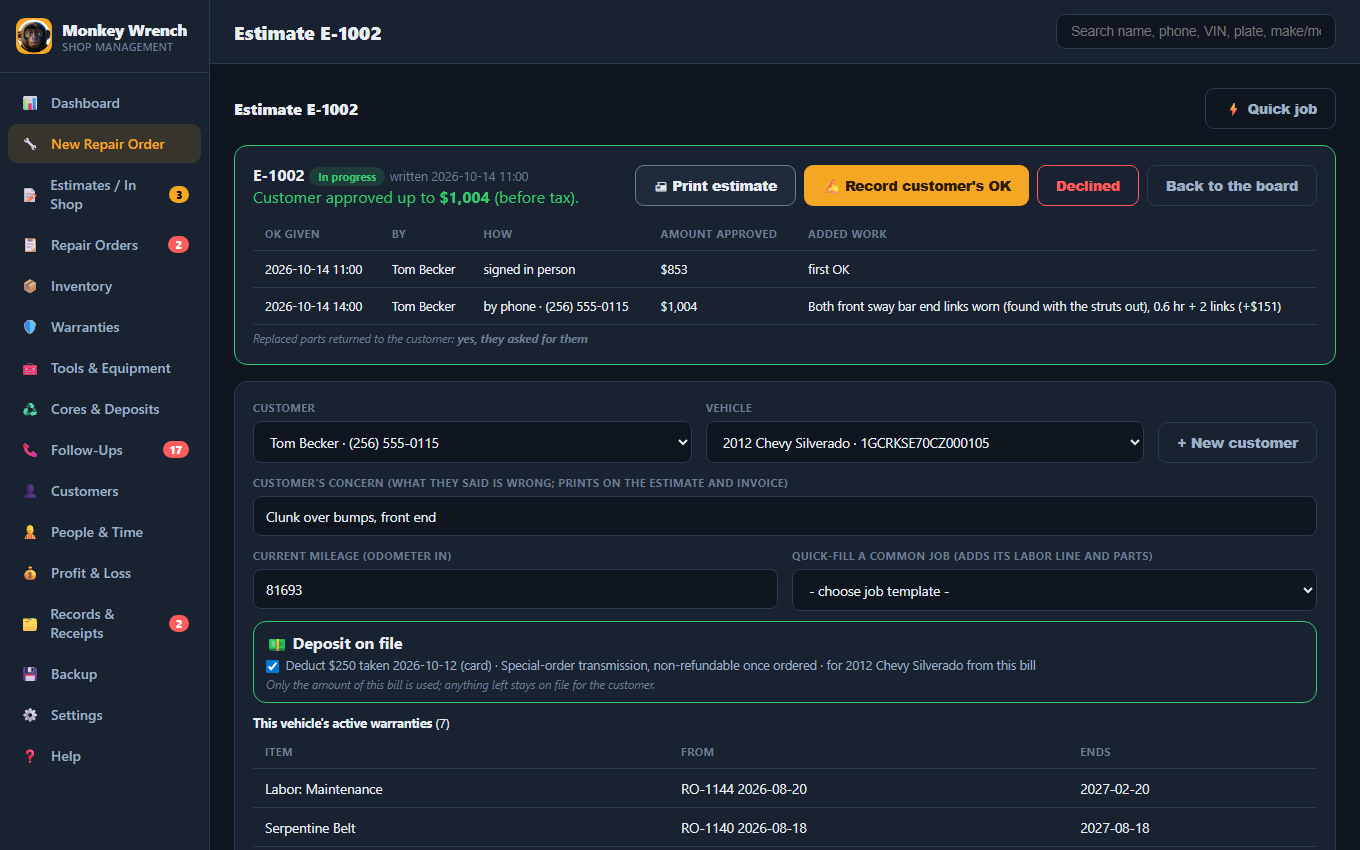
Write the car up when it rolls in and print an estimate with every part and its price. When the customer says yes, in person, by phone or by text, record who, when and how much. Found more once the wheels are off? The app won't turn the estimate into a bill until you've recorded their OK for the added work, and every OK prints on the invoice.

  • Several jobs on one ticket, each with its own tech and hours, plus sublet work and shop fees
  • A red warning when a car comes back for a part that's still under your warranty
  • Laid out after California's "Write It Right" rules for repair shops
An estimate in progress with the customer's signed OK and a phone OK for added work
Every dollar accounted for

Know who still owes you, and never lose a sale in the books

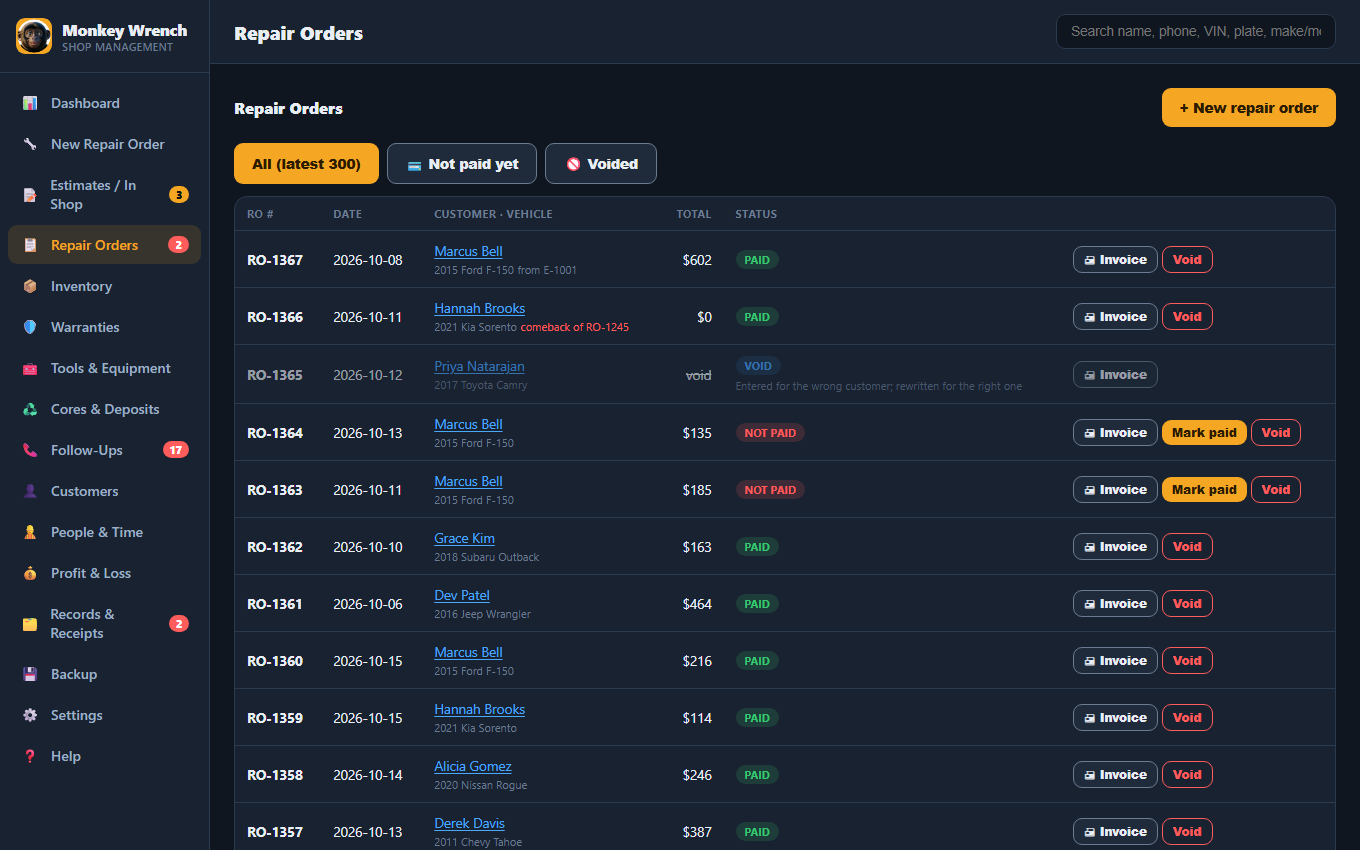
Mark a job paid now (cash, card or check) or not paid yet for your fleet and charge customers, and see everyone who still owes you on one list. Sales tax is added on parts (and labor, if your state taxes it) and kept out of your income, because it's the state's money.

  • Made a mistake? Void it with a reason: it keeps its number, parts go back on the shelf, nothing disappears
  • Parts bought at the store for one job, customer-supplied parts and no-charge comebacks all handled right
  • Close the books after your accountant files, so last year can't change by accident
Repair orders list showing paid, not paid and void
Stop leaving money at the parts store

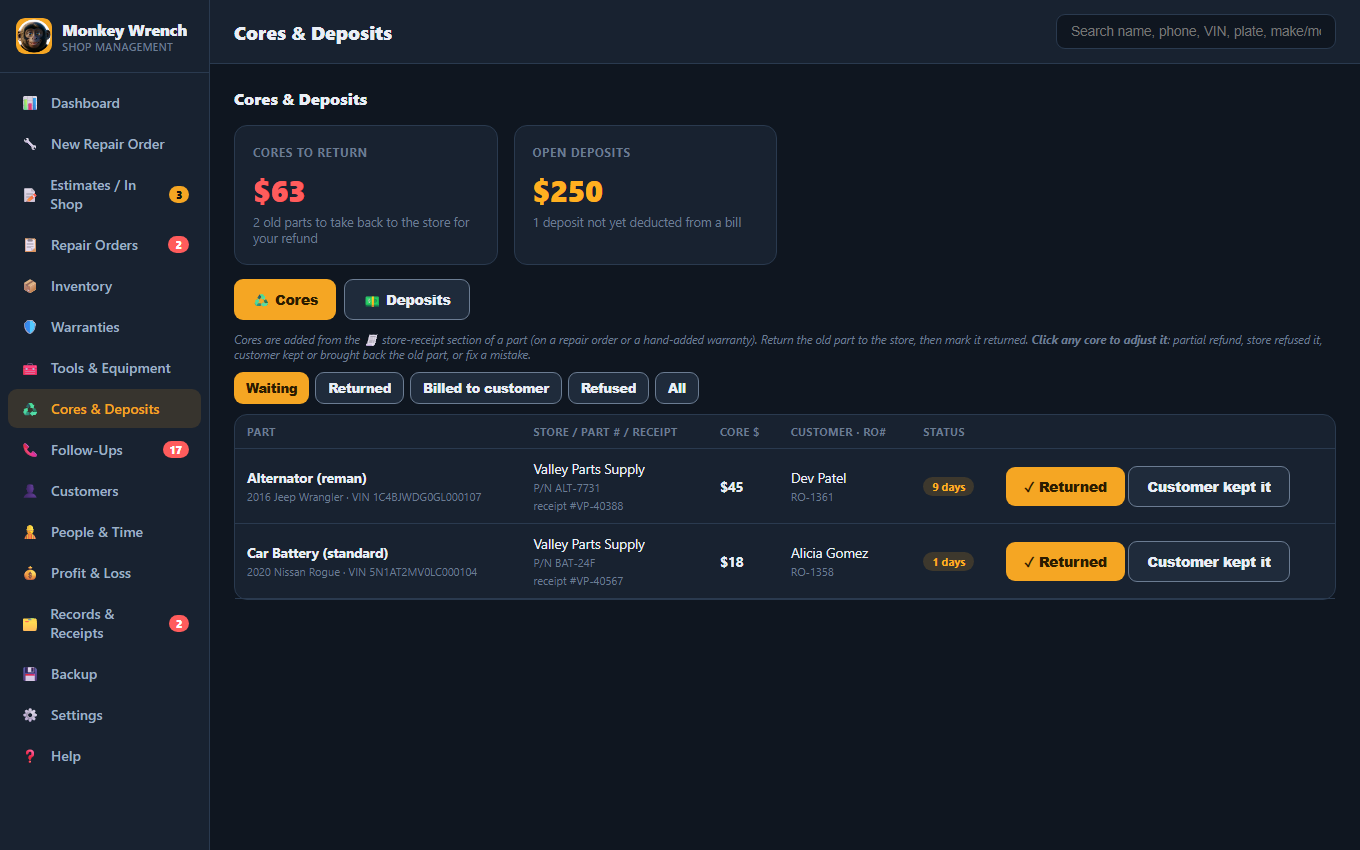
Cores and deposits, tracked to the dollar

Every core charge waits on a list until the old part goes back, with the store, part # and receipt. Partial refunds and refused cores show up as losses in your profit, not as a surprise. Deposits for big jobs come off the customer's next bill with one tick.

Cores waiting to be returned and open deposits
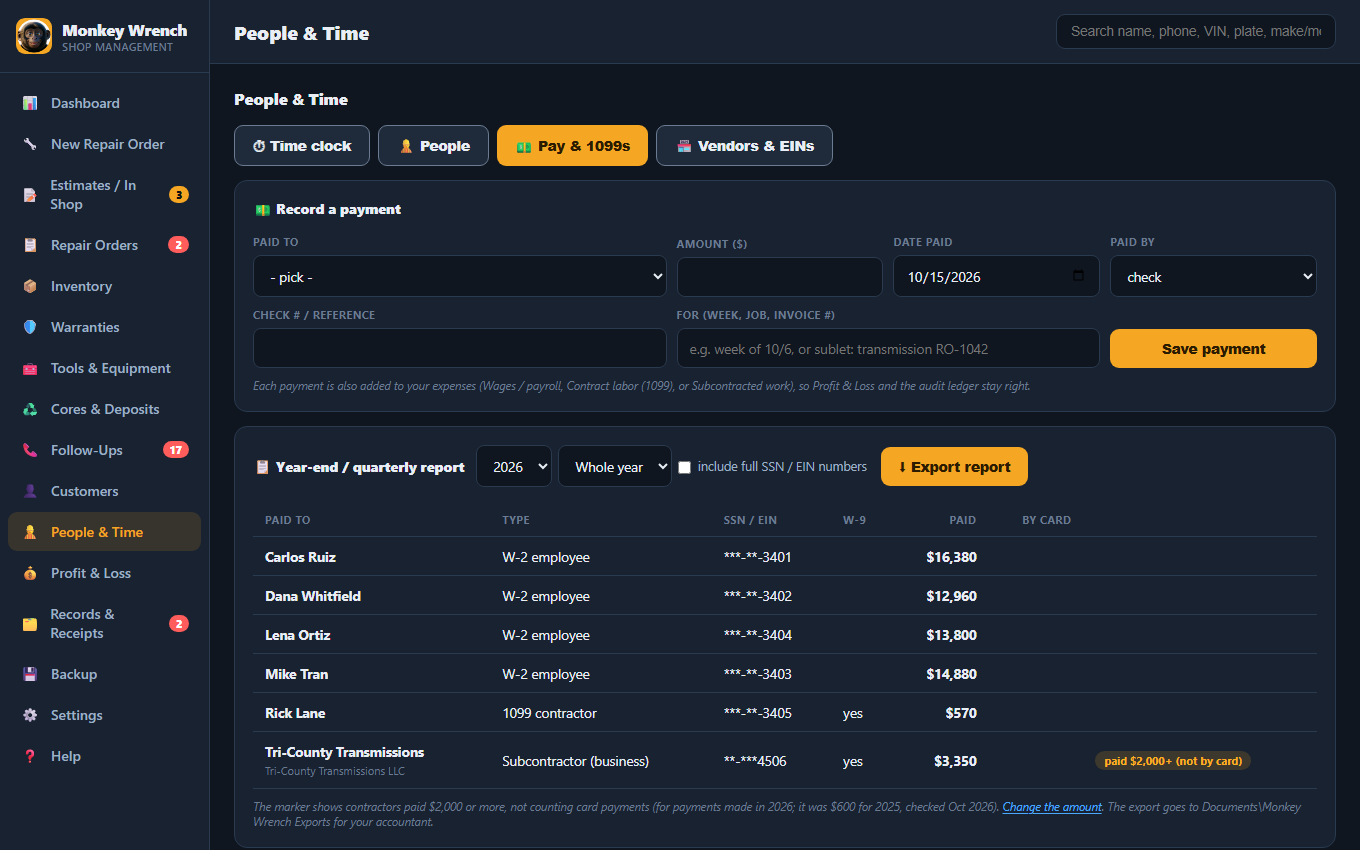
Everyone you pay, and every bill

Payroll records, contractors and outside expenses

Mechanics clock in and out with a click, or import punches from your electronic time clock. Hourly, flat-rate and salaried staff each get the right weekly totals, with overtime shown and a warning if flat-rate pay ever falls below minimum wage. Every payment you record to an employee, 1099 contractor or subcontractor lands in your expenses automatically.

  • Year-end or quarterly totals with W-9 status; contractors paid $2,000 or more (2026 rule) are marked for your accountant
  • Rent, utilities, insurance, oil pickup and every other outside bill, each with its receipt and how you paid
  • Owner draws and loan payments kept out of your profit, the way your accountant wants them

Monkey Wrench keeps your payroll records; your payroll service or accountant still handles tax withholding and filing. SSNs and EINs are stored encrypted.

Need help running the front office too? Cubic, our offline office app, handles appointments and reminders, office supplies that reorder themselves, notes and contacts. Same deal: one price, no monthly fees.
Pay records and the year-end 1099 report
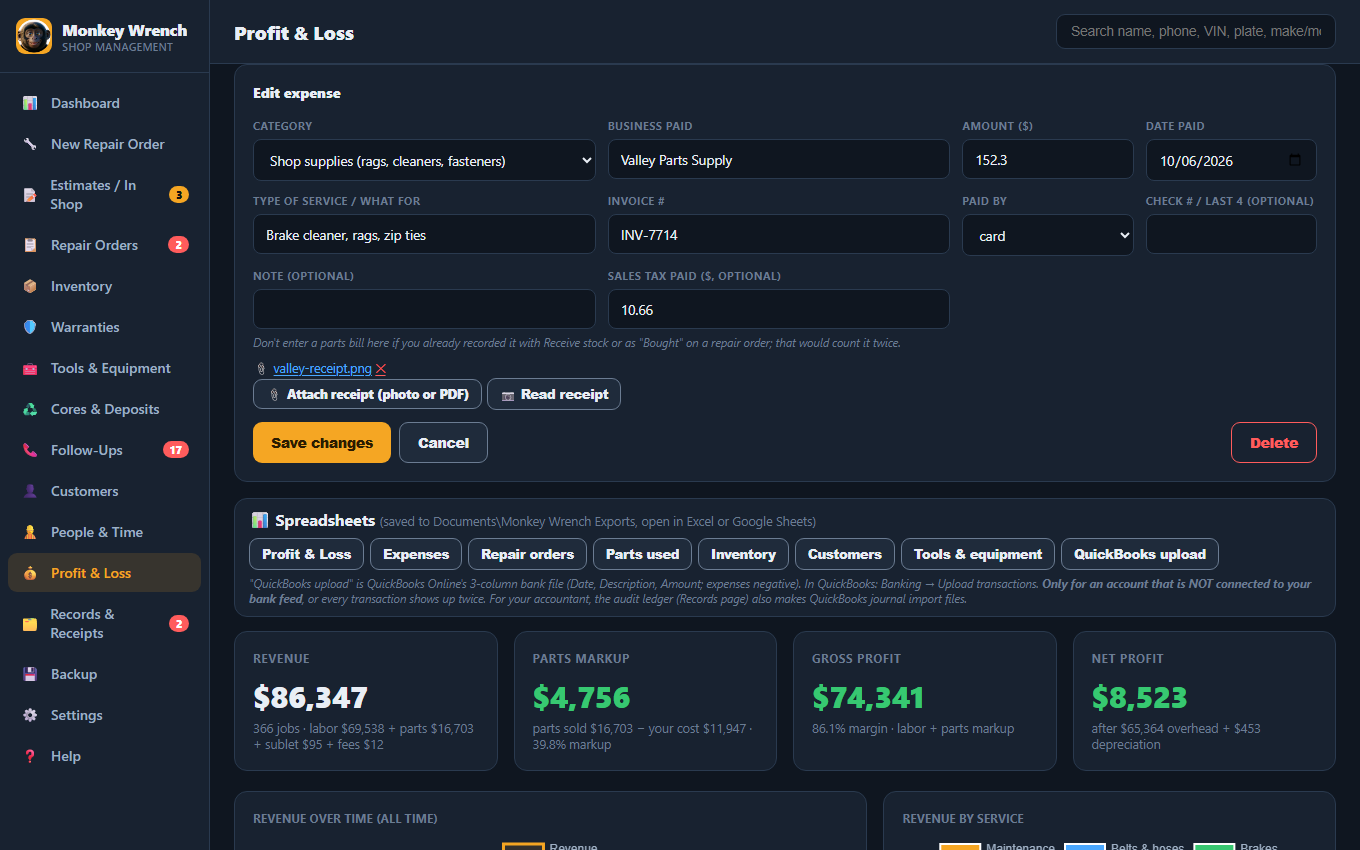
No more shoebox of receipts

Snap the receipt. It reads it for you.

Attach a photo or PDF to any expense, part or tool, and Monkey Wrench reads the store, date, invoice # and total for you to check. Forward e-receipts to a "Receipts" folder in your email and file each one with a click. A blurry photo gets flagged right away, so you can retake it while the receipt is still in your hand.

Expense with the receipt attached and read
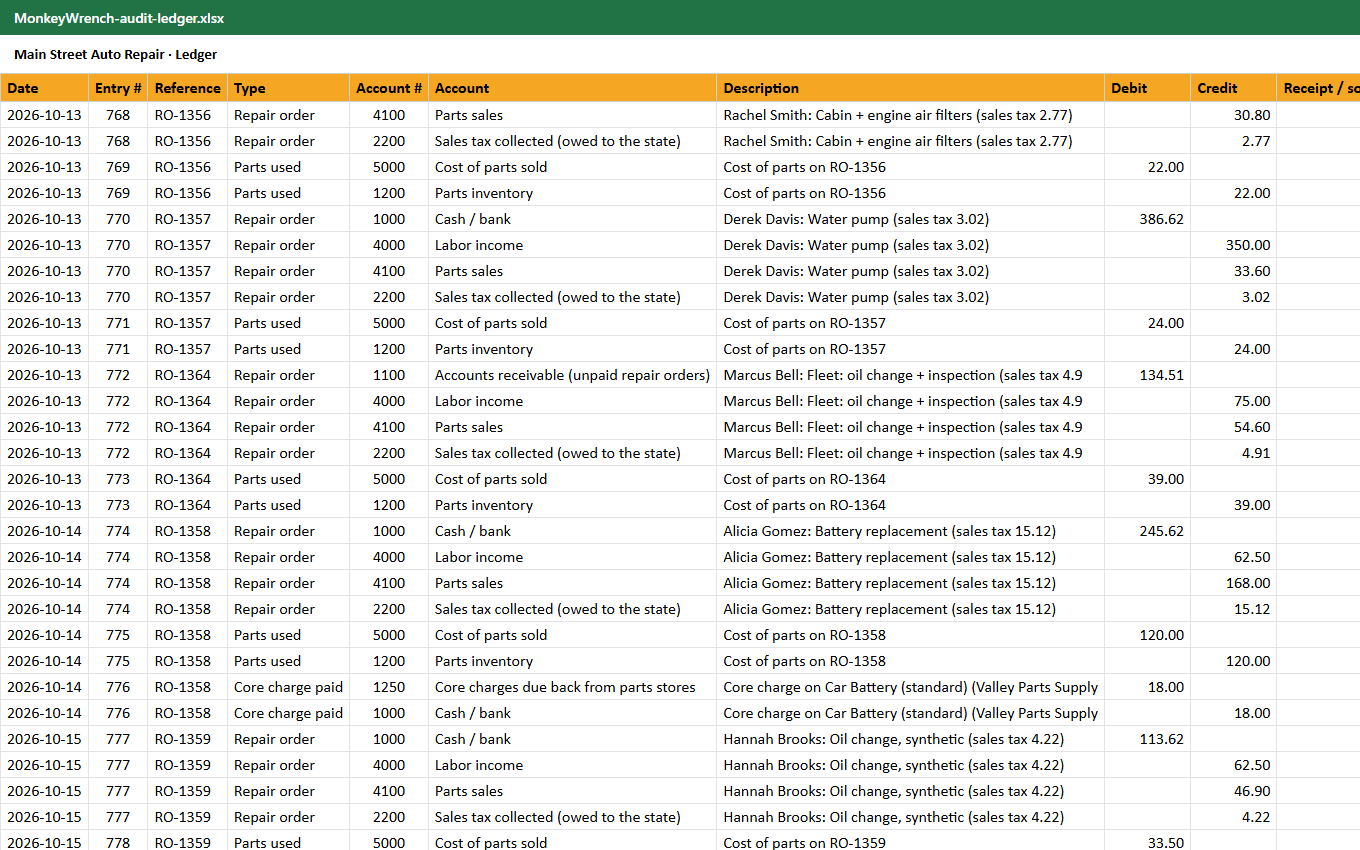
Every receipt filed. Every change on record.

Records kept the way the IRS asks

Monkey Wrench is built around IRS record-keeping guidance (Publication 583 and its rules for records kept on a computer). One click builds an itemized Excel ledger: every repair order, expense, payroll payment, deposit, stock purchase and depreciation as balanced debit and credit lines, each with its RO # or invoice # and receipt file, plus a trial balance and QuickBooks journal import files. Every add, change and delete is kept in a history that can't be edited from the app, and one zip packs it all up with the receipts.

  • Mistakes are voided, never deleted: the repair order keeps its number and your reason
  • Close the books after your accountant files, so last year can't change by accident
  • Sales tax you collect is kept apart from your income

These are your business records, organized for your accountant. Monkey Wrench isn't tax software and doesn't file returns.

Audit ledger in Excel with debit and credit columns
Your lift is an investment

Tools & equipment, warranties and depreciation

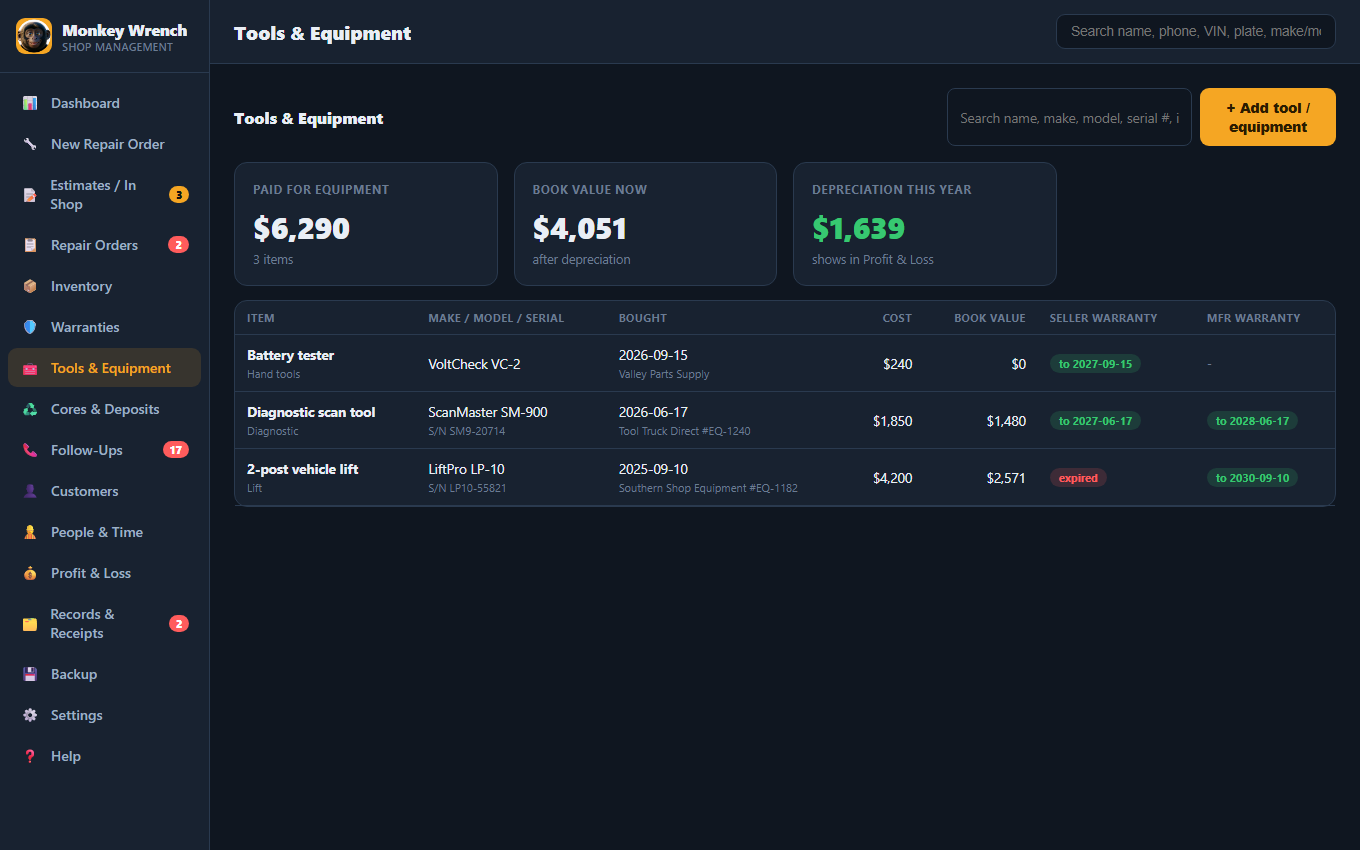
Keep the receipt, serial #, seller and manufacturer warranties for every lift and scan tool, and get a reminder before a warranty runs out. Pick a depreciation method (straight-line, MACRS 5 or 7 year, Section 179) and it shows in your profit. Your accountant has the final say on the tax side.

Tools and equipment with book value and warranties

See every screen in the user guide →

Monkey Wrench vs. the monthly guys

Honest comparison. We're built for the small shop the big software priced out.

 Monkey WrenchShopmonkeyTekmetricMitchell1
Price$79 once$239+/mo ($215 billed yearly)$179+/mo (billed yearly)not published
Works without internet✓ Yes✗ cloud✗ cloudneeds broadband
Data stays on your PC✓ Yes✗✗✓
Own it forever✓ Yes✗ rent✗ rent✗ rent
Debit/credit ledger, 1099 totals, depreciation✓ Built inbooks add-on, $99/mo extranot advertisednot advertised
Estimates with customer approval✓ Built in✓✓✓
Texting, inspection photos, parts orderingnot yet✓✓✓

Shopmonkey and Tekmetric re-checked on their pricing pages October 31, 2026; Mitchell1 from its published listings, October 2026. "Not advertised" means we didn't find it on their plan pages. Full comparison of one-time, free and monthly shop software →

One price. Yours forever.

The big tools cost $2,000–5,000 every year. Monkey Wrench costs less than one month of theirs, once.

Compare to $179–499 / month
$79 once
  • Estimates, repair orders, branded invoices, inventory, customers
  • Warranties, cores, deposits & follow-ups
  • Time clock, pay records & year-end 1099 totals
  • Receipts, Profit & Loss and an audit-ready ledger
  • Works offline · Windows 10 & 11
  • Free updates · Built-in user guide
  • No subscription, no account, no expiry
Get Monkey Wrench now
Instant download after purchase · Secure checkout

Straight talk, is it right for you?

Monkey Wrench is for the shop that runs on its own computer: a small, solo, or mobile shop that's tired of monthly fees and flaky internet. It runs on the Windows PC at your counter and keeps your data private and offline.

It's not a multi-location cloud system, and it doesn't sync live to a phone in the bay or your house. If you need a mechanic snapping inspection photos on a phone or checking in from vacation, the big cloud tools do that (for $200/month). We do the real shop work better, cheaper, and offline. We'd rather tell you the truth than sell you the wrong thing.

Not in it yet: partial payments on one invoice, texting customers, inspection photos, labor guides and parts ordering. If your shop needs those today, a monthly tool is the better fit for now.

Service reminders are estimates based on time and average driving. The Profit & Loss view and the ledger are records to understand your shop and to hand to your accountant; they aren't tax software or a payroll service.

Questions

Do I really only pay once?

Yes. $79, one time. No subscription, no account, no expiry. It's yours forever, including free updates.

Is Monkey Wrench the same as Shopmonkey?

No. Monkey Wrench is made and sold by EZDeals4U and is not related to Shopmonkey. Shopmonkey is a cloud subscription; Monkey Wrench is a Windows program you buy once for $79 and run on your own PC.

Does it need the internet?

No. Monkey Wrench runs offline on your computer. If your Wi-Fi goes down, you keep working, unlike the cloud tools. The only things that go online are optional and happen when you click them: activating your license once, and "Check email now" if you choose to collect emailed receipts.

What computers does it run on?

Windows 10 and 11. It installs like any normal program and opens in its own window.

Will my accountant be able to use what it gives them?

That's the idea. One click makes an Excel ledger with every money event as debit and credit lines, a trial balance, monthly totals and QuickBooks journal import files, plus spreadsheets for expenses, repair orders, parts, payroll payments and equipment. The Records package zips all of it together with your receipts.

Does it do payroll or file 1099s?

It records who you paid and how much, keeps time clock hours and W-9 status, and totals each person for the year or quarter. It doesn't withhold taxes or file forms; your payroll service or accountant does that with these totals.

Is my customers' and employees' information safe?

It stays on your computer. SSNs, EINs and your email password are stored encrypted and shown masked. The app goes online only to activate your license once, when you click "Check email now", or when you click a link to our site.

Where is my data stored?

On your own computer, never on someone else's server. We show you how to back it up safely (to a USB drive or a cloud folder you already use), and it repairs itself from your backup if the file is ever damaged.

Can I use my own parts, prices, and warranties?

Absolutely. Monkey Wrench comes pre-loaded with sensible auto-shop defaults, and you can change every product, price, reorder point, and warranty period to match your shop.

Is there a manual?

Yes. A full illustrated user guide is built into the app, and you can read it here before you buy.

Does it work with QuickBooks?

It doesn't connect to QuickBooks live. It makes QuickBooks journal import files, plus an Excel ledger and trial balance, that you or your accountant upload. Your shop data stays on your PC.

Does it handle sales tax?

Yes. In Settings you set your sales tax rate and choose what's taxed: parts (on by default), labor and fees (off by default; switch them on if your state taxes them). Parts, labor and fees print on separate lines, and the tax you collect is kept out of your income. It doesn't file your sales tax return. Which states tax labor?

Can I write an estimate and get the customer's OK before I start?

Yes. Write the estimate, print it with a signature line, and record each OK: who said yes, how (in person, phone, text or email), when and for how much. The repair order made from it keeps that record, the odometer reading and whether the customer wanted the old parts back. What an invoice should show

How is it different from other buy-once shop software?

Monkey Wrench is an installed Windows program, not a page that runs in your web browser. It keeps the books side too: double-entry ledger, profit and loss, payroll records, 1099 totals and receipts. Some others have things it doesn't yet, like inspection photos or texting customers. See the honest comparison